

Yes, an AI receptionist can be HIPAA-compliant. Compliance depends on how the system handles PHI, access, consent, and patient interactions.
A 2025 MGMA poll found that 68% of medical groups added or expanded their use of AI that year. Scheduling and patient communications were among the common use cases.
As AI moves into front-office workflows, healthcare organizations need to know what compliance requires in practice. An AI receptionist may handle patient information during scheduling, intake, insurance verification, and appointment communication.
Keep reading to see what healthcare organizations should check before putting an AI receptionist into patient workflows.
What does HIPAA compliance mean for an AI assistant in healthcare?
HIPAA compliance requires healthcare organizations and their business associates to protect PHI through appropriate privacy and security safeguards. For an AI assistant, those safeguards apply to the electronic PHI it receives, processes, stores, and transmits.
The HIPAA Security Rule requires covered entities and business associates to protect electronic PHI through administrative, physical, and technical safeguards.
An AI receptionist can encounter PHI during routine front-office tasks such as scheduling, intake, insurance verification, and appointment communication.
That makes the safeguards around the AI assistant part of the healthcare organization’s compliance considerations, just as HIPAA guidelines already shape how teams respond to patient reviews.
What should organizations look for in HIPAA compliance for healthcare AI assistants?
Healthcare organizations should evaluate HIPAA compliance across the entire workflow, not just the AI technology. They should consider how an AI assistant handles PHI, who can access it, and what happens when a patient request requires human intervention.
The HIPAA Security Rule specifically addresses access control, audit controls, authentication, and transmission security for electronic PHI.
A practical evaluation should cover:
| <strong>What to evaluate</strong> | <strong>Why it matters</strong> |
| PHI handling | Shows how patient information moves through the workflow |
| Access controls | Limits access to authorized users and systems |
| Authentication | Helps verify who is accessing information |
| Audit controls | Creates visibility into system activity |
| Consent handling | Establishes how patient consent is captured |
| Human escalation | Keeps judgment-based cases with appropriate staff |
For enterprise healthcare organizations, these controls also need to work across locations, which is a key test for any patient engagement tools a multi-location group evaluates. Role-based access and centralized administration become more important as more employees and practices use the same system.
If a vendor handles PHI on behalf of a healthcare organization, the appropriate contractual arrangements, including a Business Associate Agreement where applicable, should also be in place, as they would be for any HIPAA-compliant marketing automation.
How should AI assistants handle clinical questions and patient requests?
A healthcare AI assistant should handle routine administrative requests while routing clinical questions to qualified healthcare staff. Clear boundaries keep front-office automation useful without asking AI to make decisions that require clinical judgment.
Patients may contact a healthcare organization for very different reasons, whether by phone or through a healthcare webchat solution. One interaction might involve moving an appointment. Another might involve symptoms, medication, or treatment.
Administrative requests can follow defined workflows
An AI assistant can handle routine requests such as:
- “Can I move my appointment?”
- “What time is my appointment?”
- “Can I complete my intake before the visit?”
- “Can you verify my insurance?”
- “Do you have anything available next week?”
These requests have defined processes behind them. The assistant can retrieve information, follow the appropriate workflow, and complete the task when the necessary system access is available.
Clinical questions need a different path
A patient might instead ask:
- “What do these symptoms mean?”
- “Should I change my medication?”
- “Do I need treatment for this?”
- “Is this side effect normal?”
These questions can require clinical knowledge, patient-specific context, and professional judgment. An AI assistant handling the front desk, like any AI chatbot for healthcare, should not cross that line by attempting to diagnose symptoms or recommend treatment.
Instead, the interaction should move to the appropriate clinical team or nurse line.
This keeps routine administrative work moving while sending clinical questions to people equipped to handle them.
The same principle applies when an administrative workflow itself requires a decision. Organizations can choose which tasks run autonomously and which require staff approval before completion.
Good healthcare automation, built on AI human-in-the-loop principles, knows what it can handle, where it needs approval, and when a patient needs a clinical professional.
How can healthcare organizations keep control when using AI?
Healthcare organizations can control how AI operates by defining permissions, approval requirements, and workflows for each practice or location.
Key controls can include:
- Approval workflows: Run autonomously or keep staff involved, depending on the practice.
- Role-based access: Give users access based on their responsibilities.
- Enterprise SSO: Centralize access across locations.
- Custom workflows: Configure processes by practice and location without requiring engineering.
A health system may need consistent operating standards across hundreds of locations while still allowing individual practices to follow their own workflows.
That gives enterprise teams a way to standardize AI operations without requiring staff to manage every routine interaction.
How is Myna HIPAA-compliant for healthcare front-office workflows?
Myna, Birdeye's Operations AI Coworker, is HIPAA-compliant and built for healthcare front-office workflows involving patient information. It handles defined administrative work while keeping clinical questions with the appropriate clinical team.
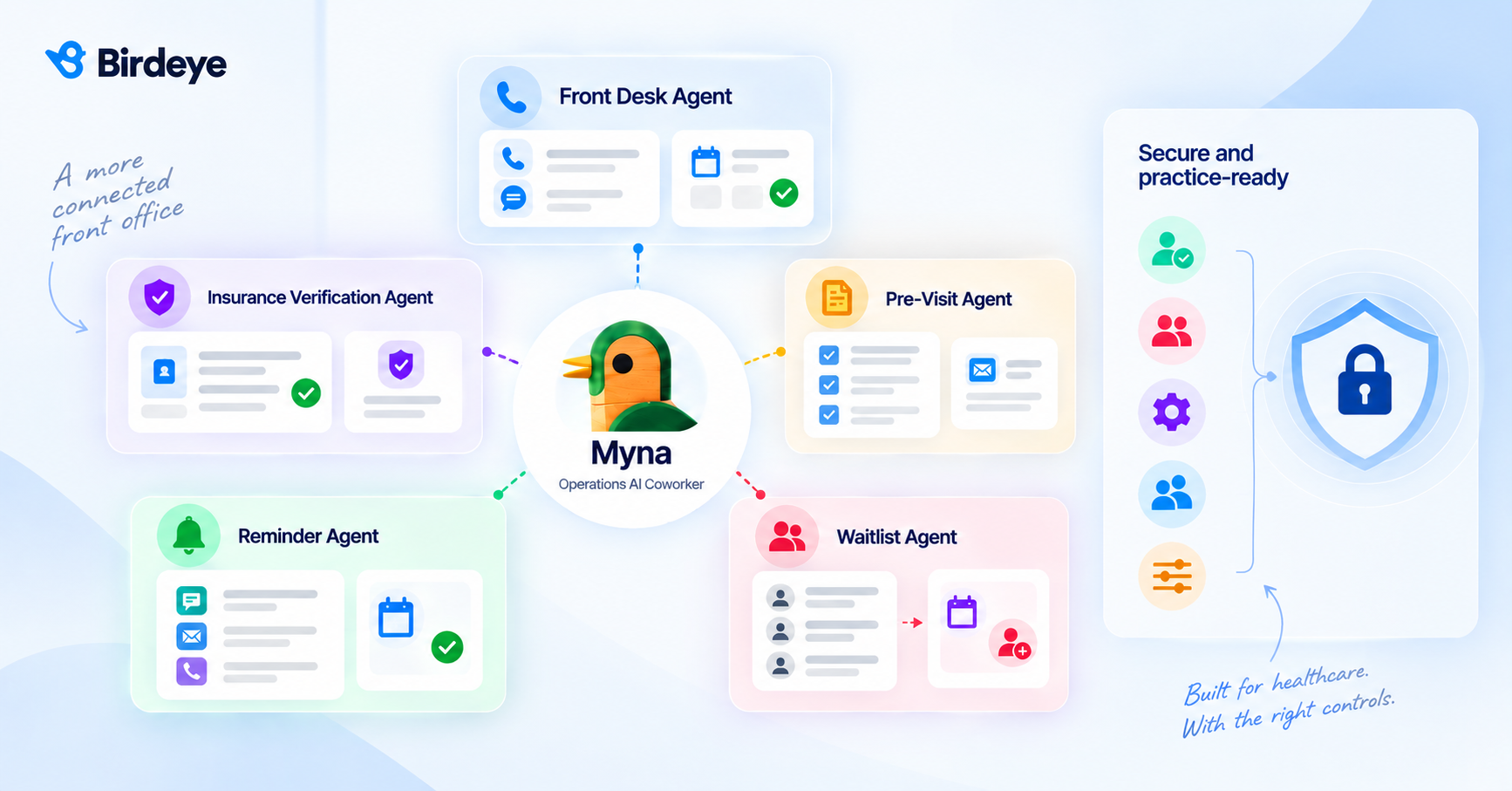
Myna's healthcare workflow includes five coordinated agents:
- Front Desk Agent: Handles calls and chats 24/7 and books, reschedules, or cancels appointments in the EHR.
- Insurance Verification Agent: Verifies eligibility and attaches the policy to the appointment.
- Pre-Visit Agent: Sends intake before the visit and follows up until completion.
- Reminder Agent: Confirms appointments through HIPAA-compliant text messaging, email, and voice.
- Waitlist Agent: Matches open appointment slots with patients on the waitlist after cancellations.
Myna also gives healthcare organizations control over how those workflows operate:
- Consent captured on every call
- Clinical questions routed to the nurse line
- Autonomous or staff-in-the-loop approval workflows
- Role-based access and enterprise SSO
- Custom workflows by practice and location
These capabilities let Myna handle defined front-office work while staff remain responsible for situations that require human judgment.
FAQs
What should healthcare organizations remember about HIPAA and AI?
An AI receptionist can be HIPAA-compliant when the right safeguards and workflow controls are in place. Healthcare organizations also need clear boundaries for clinical questions and human oversight.
Myna, Birdeye's Operations AI Coworker, brings HIPAA-compliant AI into defined healthcare front-office workflows while keeping clinical questions with clinical staff.
See how Myna can automate healthcare front-office work while keeping your organization in control.
About the Author
Somya is a Content Editor at Birdeye with 9+ years of experience in content management, primarily supporting B2B SaaS brands. She brings a strong command of content strategy, SEO, GEO, and editorial planning, along with a sharp eye for crafting narratives that engage and convert. Over the years, Somya has helped scale content operations, optimize digital presence, and drive organic growth & AI visibility for fast-paced tech companies. When she’s not writing or immersed in editorial calendars, you can find her playing with her dog, Kaizer. Connect with Somya Yesodharan on LinkedIn.